How to switch from Gmail to Tuta
Which email do you use now?
Switch to Tuta
Tick each step when it's done. Nothing gets deleted: everything in your current email stays put until you remove it yourself.
Gmail
Tuta can't copy your old mail automatically. On Tuta's most expensive plan, Legend, you can it yourself: you download your mail from Gmail as a file and add it to Tuta (steps 2 and 3). Not on Legend? Then your old mail simply stays in Gmail, and you can keep looking things up there. Want to bring all your old mail without Legend? Proton Mail or Mailbox.org copy it for you.
- Sign up at tuta.com
Good to know
Good to know: free Tuta accounts are deleted if you don't log in for more than six months, and Tuta doesn't say it warns you first. Most free email has a rule like this (Proton after 12 months, Google and Microsoft after 2 years), but Tuta's is the shortest. Log in at least every few months, or choose a paid plan: the rule is for free accounts.
-
Good to know
How: go to takeout.google.com, click “Deselect all”, tick only Mail and create the . You get a mail file () to download.
-
Good to know
How: install Tuta's free app for your computer (Windows: app.tuta.com/desktop/tutanota-desktop-win.exe, Mac: app.tuta.com/desktop/tutanota-desktop-mac.dmg). Open Settings › Email Import, choose a folder (for example “Imported”), click Import and pick your file.
-
Good to know
This can only be done on a computer, not in the Gmail app.
- Tuta Mail in the App Store
Good to know
Android: Tuta Mail in Google Play.
-
Good to know
There's no need to do it all at once. After a while, hardly anything arrives at the old address any more.
Outlook / Hotmail
Tuta can't copy your old mail automatically. Your old mail simply stays in Outlook, and you can keep looking things up there. Want to bring all your old mail? Proton Mail or Mailbox.org copy it for you.
- Sign up at tuta.com
Good to know
Good to know: free Tuta accounts are deleted if you don't log in for more than six months, and Tuta doesn't say it warns you first. Most free email has a rule like this (Proton after 12 months, Google and Microsoft after 2 years), but Tuta's is the shortest. Log in at least every few months, or choose a paid plan: the rule is for free accounts.
-
Good to know
Not offered? You can still add contacts in Tuta's Contacts, one by one.
-
Good to know
Outlook may ask you to sign in again before it shows the forwarding settings. That's normal.
- Tuta Mail in the App Store
Good to know
Android: Tuta Mail in Google Play.
-
Good to know
There's no need to do it all at once. After a while, hardly anything arrives at the old address any more.
iCloud Mail
Tuta can't copy your old mail automatically. On Tuta's most expensive plan, Legend, you can it yourself: you download your mail from iCloud as a file and add it to Tuta (step 2, with a Mac). Not on Legend? Then your old mail simply stays in iCloud, and you can keep looking things up there. Want to bring all your old mail without Legend? Proton Mail or Mailbox.org copy it for you.
- Sign up at tuta.com
Good to know
Good to know: free Tuta accounts are deleted if you don't log in for more than six months, and Tuta doesn't say it warns you first. Most free email has a rule like this (Proton after 12 months, Google and Microsoft after 2 years), but Tuta's is the shortest. Log in at least every few months, or choose a paid plan: the rule is for free accounts.
-
Good to know
How: in the Mail app on your Mac, select your iCloud mailboxes, choose Mailbox › Mailbox and pick a folder. You get files. Then import them into the Tuta app on your computer (Settings › Email Import).
-
Good to know
Leave “Delete messages after forwarding” off for now. Then you still have a copy in iCloud if something goes wrong.
- Tuta Mail in the App Store
Good to know
Android: Tuta Mail in Google Play.
-
Good to know
There's no need to do it all at once. After a while, hardly anything arrives at the old address any more.
Yahoo Mail
Tuta can't copy your old mail automatically. Your old mail simply stays in Yahoo, and you can keep looking things up there. Want to bring all your old mail? Proton Mail or Mailbox.org copy it for you.
- Sign up at tuta.com
Good to know
Good to know: free Tuta accounts are deleted if you don't log in for more than six months, and Tuta doesn't say it warns you first. Most free email has a rule like this (Proton after 12 months, Google and Microsoft after 2 years), but Tuta's is the shortest. Log in at least every few months, or choose a paid plan: the rule is for free accounts.
-
Good to know
Not offered? You can still add contacts in Tuta's Contacts, one by one.
-
Good to know
On free Yahoo Mail there is no forwarding. Then open Yahoo once a week for the next few months, so you don't miss anything.
- Tuta Mail in the App Store
Good to know
Android: Tuta Mail in Google Play.
-
Good to know
There's no need to do it all at once. After a while, hardly anything arrives at the old address any more.
All done? Then tap I've switched ✓.
Rather use Proton Mail or Infomaniak Mail or Mailbox.org?
Nice, that's one! Your email is with Tuta now.
Keep your old one around for a while. There's no rush to close it.
And your current email? What to do with it, when you're ready
Keep your current email: with Tuta, it's where your old mail stays. Forwarding brings new mail to Tuta, and you can still look up old messages. Only close it once you've saved what you want to keep and hardly anything arrives there any more.
Deleting your Gmail, when you're ready
- Download a copy of your Gmail
Go to takeout.google.com. Click “Deselect all”, tick only Mail, click “Next step” at the bottom and then “Create ”. Google emails you a download link when it's ready. Keep the file somewhere safe.
What it looks like
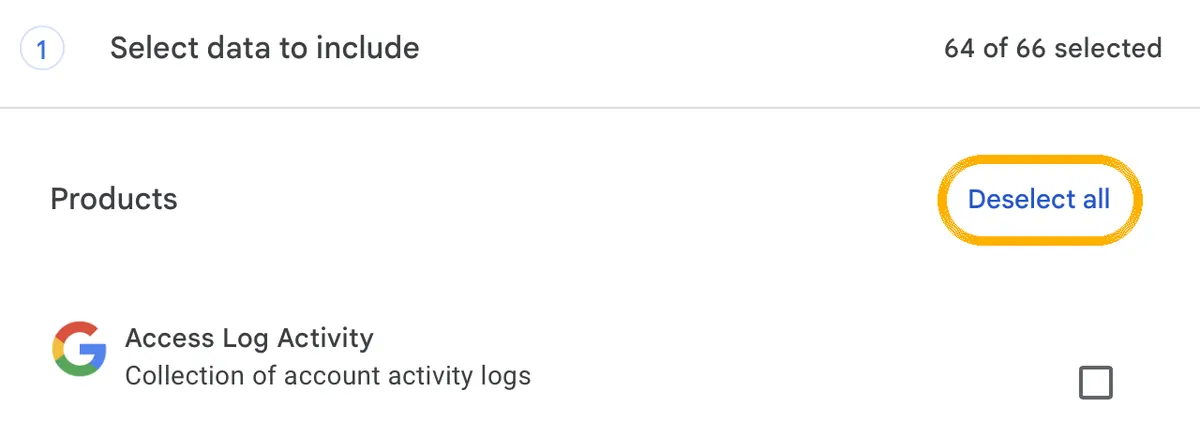
1. Click this first. Then nothing is ticked any more. 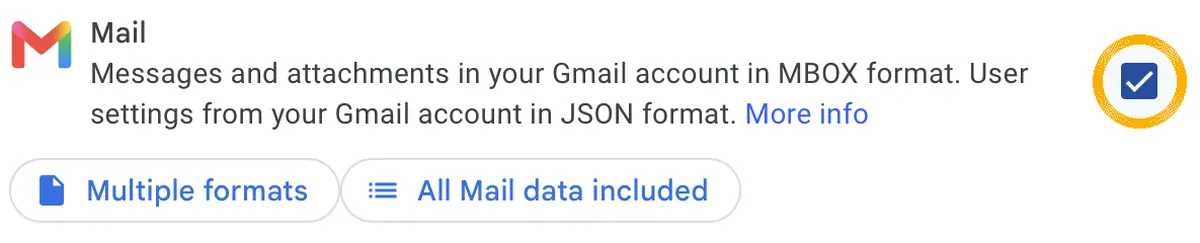
2. Scroll to Mail and tick only that. 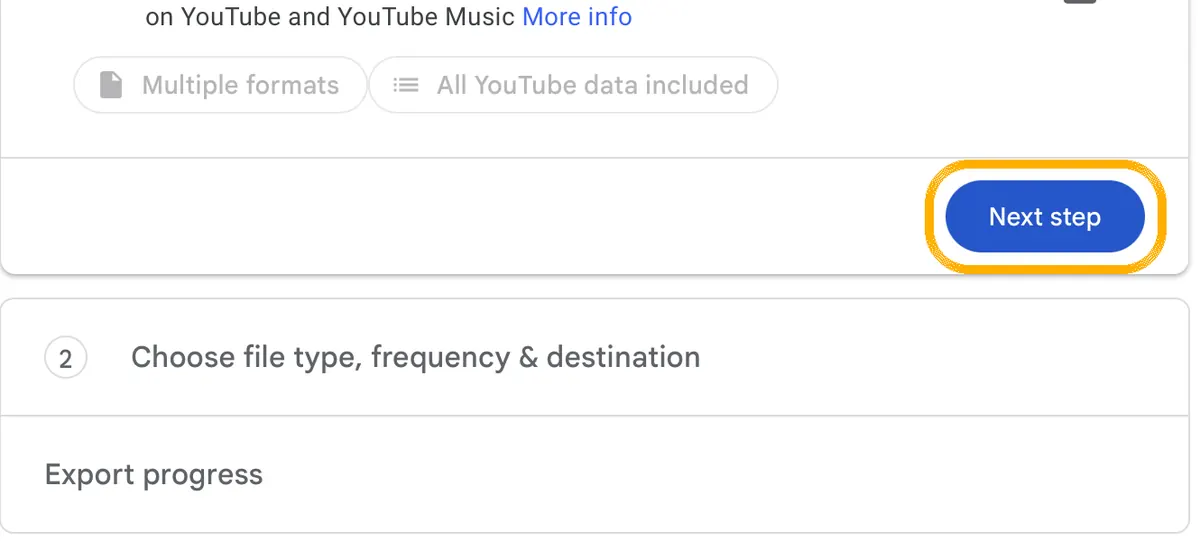
3. At the very bottom: Next step. 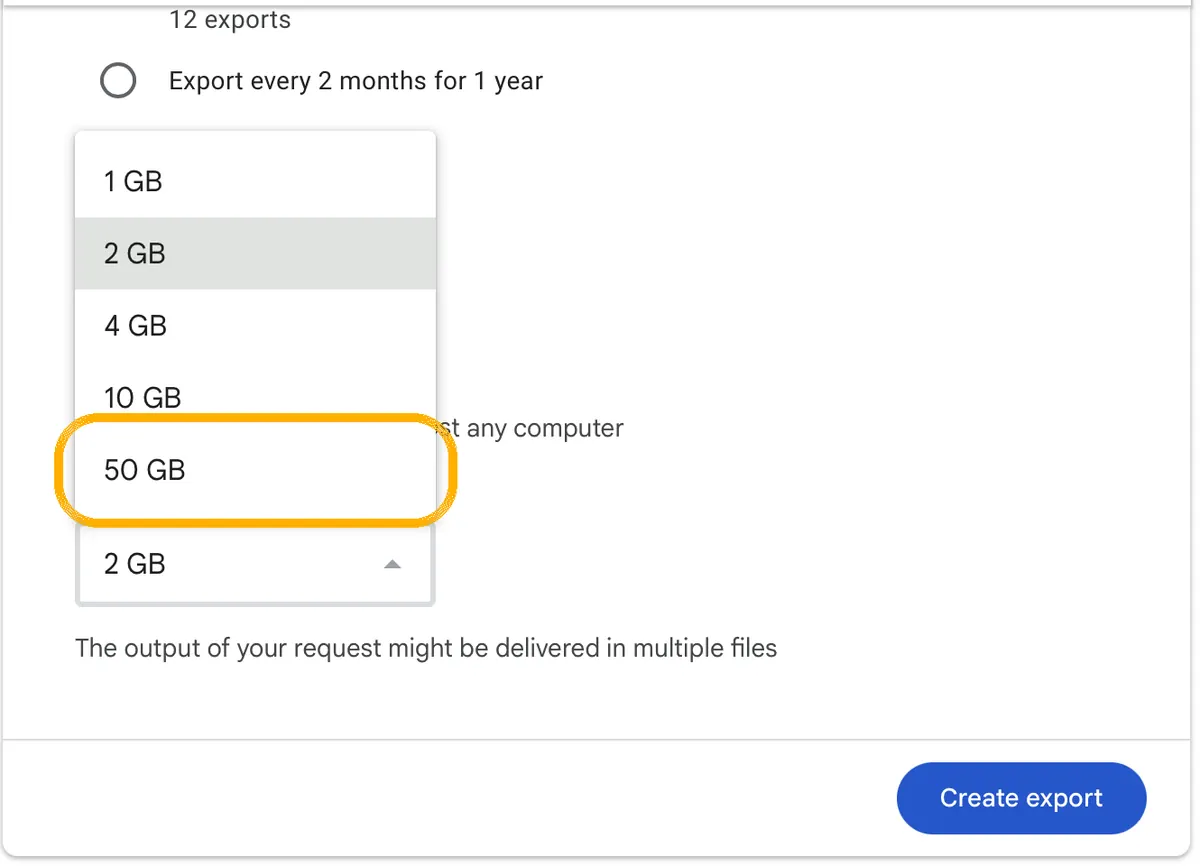
4. Choose 50 GB as the file size and click Create export. Good to know
Downloading doesn't delete anything at Google.
- Delete only Gmail, not your whole Google Account
Go to your Google Account and open Data & privacy. Scroll to “Data from apps and services you use” and click “Delete a Google service”. Next to Gmail, click Delete.
myaccount.google.comData & privacyDelete a Google serviceGmailDelete
Good to know
Your Google Account, YouTube, Photos, Drive and Play Store purchases stay. Only your Gmail address and its mail are deleted.
- Give your new address as your Google login
Google asks for another email address to sign in to Google with from now on. Type your new address and click “Send verification email”. Open that email and confirm. Only then is Gmail deleted.
- Thinking of deleting your whole Google Account? Read this first
That deletes much more than Gmail: your photos, Drive files, YouTube, and everything you bought in Google Play. On an Android phone you can no longer get or update apps. Download what you want to keep at takeout.google.com first. Only then: Data & privacy › Delete your Google Account (near the bottom).
Good to know
For most people, deleting only Gmail (above) is enough.
Closing Outlook.com or Hotmail, when you're ready
- Know this first: closing Outlook.com closes your Microsoft account
Microsoft has no way to close only the mailbox. Closing it also ends Windows sign-in with that account, Office, OneDrive and Xbox, and deletes saved BitLocker recovery keys. Use any of those? Then simply keep the account and stop using its mail.
- Save what you want to keep
Your mail is already copied. Also export your contacts (People › Manage contacts › Export contacts) and download anything you keep in OneDrive.
- Close the account
Sign in, check it's the right account and click Next. Tick the boxes to confirm you've read each point, choose 30 or 60 days to change your mind, pick a reason and click “Mark account for closure”.
Good to know
Within those 30 or 60 days you can reopen the account by signing in. After that, Microsoft deletes your mail and data.
Stopping with iCloud Mail
- Know this: you can't delete just iCloud Mail
Your @icloud.com address belongs to your Apple Account. It can only go if you delete the whole Apple Account. So the simplest choice: leave the forwarding on, and stop using iCloud Mail.
- Turn iCloud Mail off on your iPhone
Your old address then disappears from the Mail app.
Settingsyour nameiCloudMailUse on this iPhone
Good to know
On a Mac: System Settings › your name › iCloud › Mail, and turn off this Mac.
- Deleting your whole Apple Account? Only if you leave Apple entirely
This deletes everything in iCloud (photos, documents, mail), and you lose access to apps, music and films you bought. First back up your iCloud data and sign out of iCloud on all your devices, or you may not be able to use them afterwards. Then go to privacy.apple.com and choose “Request to delete your account”.
Closing Yahoo Mail, when you're ready
- Save what you want to keep
Your mail is already copied. Yahoo advises downloading any other data you want to keep before you close the account.
- Close the Yahoo account
Sign in to Yahoo's “delete my account” page and follow the steps on screen. This deletes your mail, folders and calendar.
Good to know
Paying for Yahoo Mail Plus? You can only close the account 90 days after your paid period has ended. You can reopen the account by signing in within 30 days.
Do I always get a new email address?
If your address is from Gmail, Outlook, iCloud or Yahoo (like jan@gmail.com): yes, that address belongs to them. Do you have your own domain name (like jan@jansen.com)? Then you can keep your address and only move where your mail is stored. That needs a paid plan: Revolutionary or Legend (not the free plan). You then change a few settings (DNS records) at the company where you bought your domain name; the new provider shows you which. People can keep mailing you at your old address.
Do I lose my old mail if I close my old account?
Yes, unless you saved it first. Tuta can't copy it yet. Download a copy (for Gmail with ) and keep the file safe, or keep the old account open as an archive.
Is it a risk to keep my old account for a while?
Not really. It's actually wise for a few months, so forwarded mail keeps coming in and you can look up old messages. Do make sure it still has a strong password and two-step login, because anyone who gets into your old mailbox can reset passwords for your other accounts.
What happens if I just stop using it?
Google may delete a Google Account that hasn't been used for two years, and Microsoft may close an Outlook.com account if you don't sign in for two years. That is a reason to close it yourself, once your contacts have your new address, rather than lose it without warning.
Does my old provider still have my mail after I copied it?
Yes. Copying doesn't remove anything. Your mail stays with Google, Microsoft, Apple or Yahoo until you delete it or close the account. See the steps above.
Photos in the cloud
Instead of Google Photos, iCloud Photos, OneDrive and other storageKeep your progress?
Just your email. No password: I send you a code.
Check your email
I sent a 6-digit code to . It works for 10 minutes. Not in your inbox? Check your spam folder.
✓ Saved
You're logged in as . Your progress is saved and you can continue on any device. Your account
I only store your email and your progress. Privacy
·
What is Tuta? Who's behind it, privacy and cost →
Checked against the official help pages on 4 October 2026. Sources
Sources
- Tuta: pricing (incl. custom domains)
- Tuta: how to use Tuta Mail (email import, Legend plan)
- Tuta: One-Click Migration in closed beta (July 2026)
- Tuta: desktop apps
- Tuta: importing contacts
- Tuta: support (inactive free accounts)
- Proton: inactive free accounts
- Yahoo: inactive mailboxes
- Apple: export mailboxes in Mail on Mac
- Google: automatically forward Gmail messages
- Google: delete your Google Account or Gmail
- Google: download your Google data (Takeout)
- Google: export contacts
- Google: inactive account policy
- Microsoft: turn on automatic forwarding in Outlook
- Microsoft: export contacts from Outlook.com
- Microsoft: close your Outlook.com account
- Microsoft: how to close your Microsoft account
- Microsoft: account activity policy
- Apple: automatically forward email on iCloud.com
- Apple: app-specific passwords
- Apple: set up iCloud Mail on your devices
- Apple: change or remove Apple Account email addresses
- Apple: how to delete your Apple Account
- Yahoo: automatic forwarding (Yahoo Mail Plus)
- Yahoo: close or reactivate your account
Copy your things, like bookmarks or mail, from the old app into the new one. The originals stay where they are.
Save a copy of your things from an app into a file, so you can keep it or open it somewhere else.
A file type that holds a whole mailbox, all your emails in one file.
A file type for contacts, with names, phone numbers and email addresses.
Your old address passes new mail on to your new address automatically, so you don't miss anything.
Keeps the same bookmarks, passwords and settings on all your devices, like your computer and phone.
Google's own tool to download a copy of everything you have at Google, like mail, photos and files.