How to switch from Microsoft Office to LibreOffice
Switch to LibreOffice
Tick each step when it's done. Nothing gets deleted: everything in your current office apps stays put until you remove it yourself.
LibreOffice is for your computer. There's no official full phone app. On a phone, Collabora Office (from the UK, built on LibreOffice) can open and edit the same files.
Mac
- libreoffice.org/download
Good to know
Not sure which chip your Mac has? Click the Apple menu at the top left of your screen › About This Mac: it says “Chip” for Apple Silicon or “Processor” for Intel. Want the menus in your own language? Also download the language pack (“Translated User Interface”) on the same page, and install it after LibreOffice.
-
Good to know
Your Mac may ask for your password. The first time you open it, your Mac asks if you're sure you want to open an app from the internet. Click Open.
-
Many Google documents?
Download them all at once with : go to takeout.google.com, click “Deselect all”, tick only Drive, click “Next step” and then “Create export”. You get an email with a download link; documents arrive as Word files and spreadsheets as Excel files. Takeout only includes documents you own: download the ones others shared with you yourself.
Good to know
LibreOffice can sometimes open Pages and Numbers files directly, but the layout often goes wrong. Exporting to Word and Excel works better.
-
Good to know
Fonts look different? Your document may use a font your computer doesn't have, so LibreOffice uses a similar one.
-
Good to know
Now a double-click on any Word or Excel file opens LibreOffice.
-
Good to know
How: under “Document type” pick Text document and under “Always save as” the Word option (.docx). Then do the same for Spreadsheet with the Excel option (.xlsx). When you save a Word file, LibreOffice may ask which format to keep: choose the Word format.
Windows
- libreoffice.org/download
Good to know
Only choose “Windows (ARM64)” if your laptop has a Snapdragon (ARM) chip.
-
Good to know
Windows asks if you want to allow the app to make changes. Click Yes. When it's done, click “Finish”.
-
Many Google documents?
Download them all at once with : go to takeout.google.com, click “Deselect all”, tick only Drive, click “Next step” and then “Create export”. You get an email with a download link; documents arrive as Word files and spreadsheets as Excel files. Takeout only includes documents you own: download the ones others shared with you yourself.
Good to know
LibreOffice can sometimes open Pages and Numbers files directly, but the layout often goes wrong. Exporting to Word and Excel works better.
-
Good to know
Fonts look different? Your document may use a font your computer doesn't have, so LibreOffice uses a similar one.
-
Good to know
How: under “Document type” pick Text document and under “Always save as” the Word option (.docx). Then do the same for Spreadsheet with the Excel option (.xlsx). When you save a Word file, LibreOffice may ask which format to keep: choose the Word format.
All done? Then tap I've switched ✓.
Rather use Proton Docs & Sheets or Infomaniak Docs & Grids?
Nice, that's one! You write with LibreOffice now.
Keep your old one around for a while. There's no rush to close it.
And your current office apps? What to do with it, when you're ready
You don't have to remove your current office apps right away. Use LibreOffice next to it for a while and open your important documents in both. Cancel or delete only when you haven't needed your current office apps for a while.
Stopping Microsoft Office
- First, save what's in OneDrive
When you cancel, your OneDrive storage goes back to the free 5 GB. If you use more than that, you can't add files any more, and after six months Microsoft may delete your OneDrive. So download anything you want to keep first, at onedrive.com.
Good to know
Moving your OneDrive files to new storage? The part “Files in ” shows how. Bought Office once (Office 2021 or 2024)? Then there's no subscription to cancel: go straight to removing the apps.
- Cancel Microsoft 365
Sign in with the Microsoft account you pay with and click “Cancel subscription” (it may say “Upgrade or Cancel”). At the bottom of the next page, click “I don't want my subscription”.
account.microsoft.com/services/microsoft365
Good to know
You can use Office until the end of the period you paid for. Bought it in the App Store or Google Play? Then you cancel it there, not at Microsoft.
- Remove the Office apps from your Mac
Open Finder › Applications. Drag Word, Excel, PowerPoint and the other Microsoft apps you no longer use to the Trash, one by one. Then restart your Mac.
Good to know
Still use Outlook for email? Leave Outlook. Microsoft also lists a few hidden folders you can remove; see “Uninstall Office for Mac” under Sources.
- First, save what's in OneDrive
When you cancel, your OneDrive storage goes back to the free 5 GB. If you use more than that, you can't add files any more, and after six months Microsoft may delete your OneDrive. So download anything you want to keep first, at onedrive.com.
Good to know
Moving your OneDrive files to new storage? The part “Files in the cloud” shows how. Bought Office once (Office 2021 or 2024)? Then there's no subscription to cancel: go straight to removing the apps.
- Cancel Microsoft 365
Sign in with the Microsoft account you pay with and click “Cancel subscription” (it may say “Upgrade or Cancel”). At the bottom of the next page, click “I don't want my subscription”.
account.microsoft.com/services/microsoft365
Good to know
You can use Office until the end of the period you paid for. Bought it in the App Store or Google Play? Then you cancel it there, not at Microsoft.
- Remove Office from Windows
Press the Windows key and type “control panel”. Open it, choose Programs › Programs and Features, click Microsoft 365 (or Microsoft Office) and click Uninstall.
Good to know
Uninstalling only removes the apps. Your own documents stay on your computer.
Deleting your Google documents, when you're ready
- Download everything at once
Go to takeout.google.com. Click “Deselect all”, tick only Drive, click “Next step” and then “Create export”. You get an email with a download link when it's ready.
What it looks like
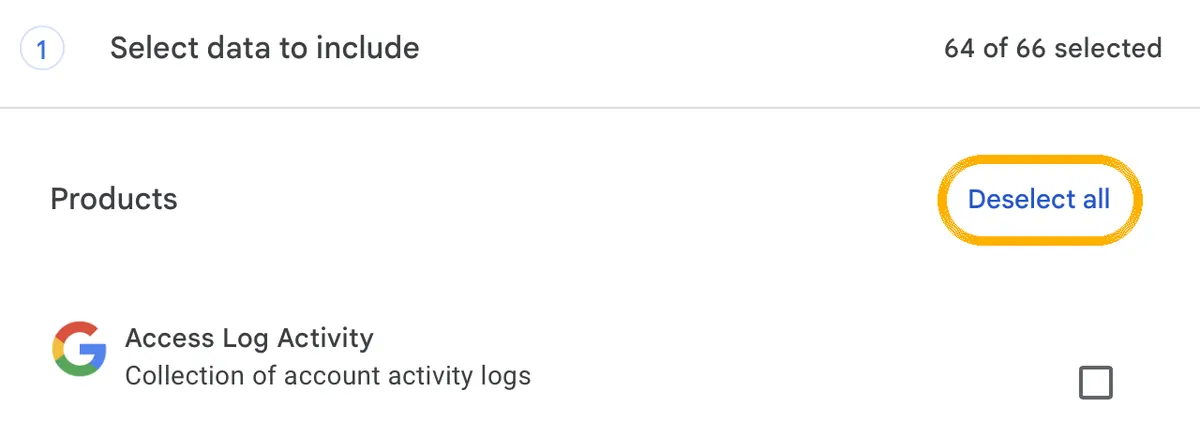
1. Click this first. Then nothing is ticked any more. 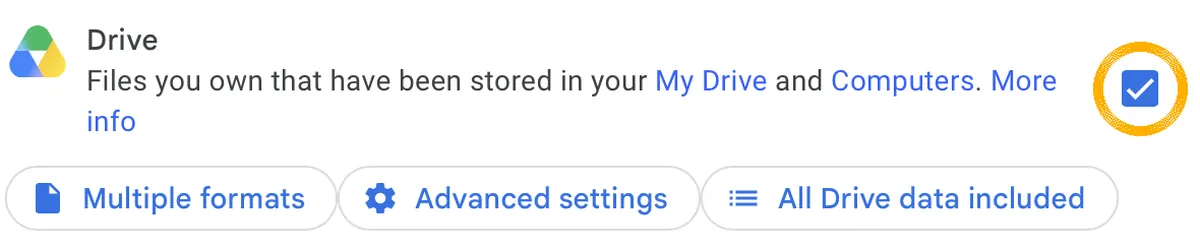
2. Scroll to Drive and tick only that. 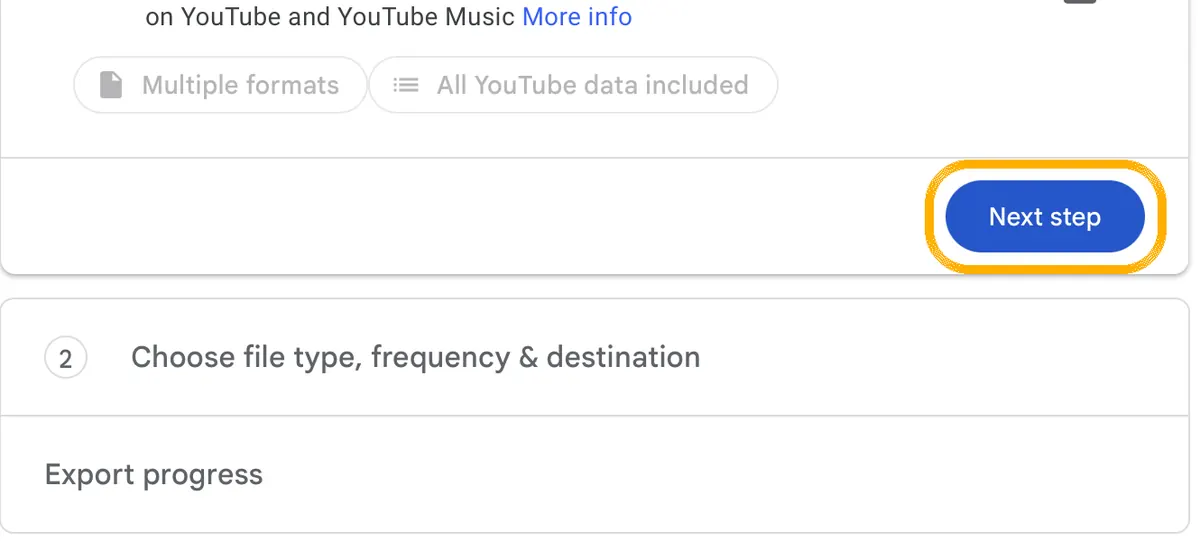
3. At the very bottom: Next step. 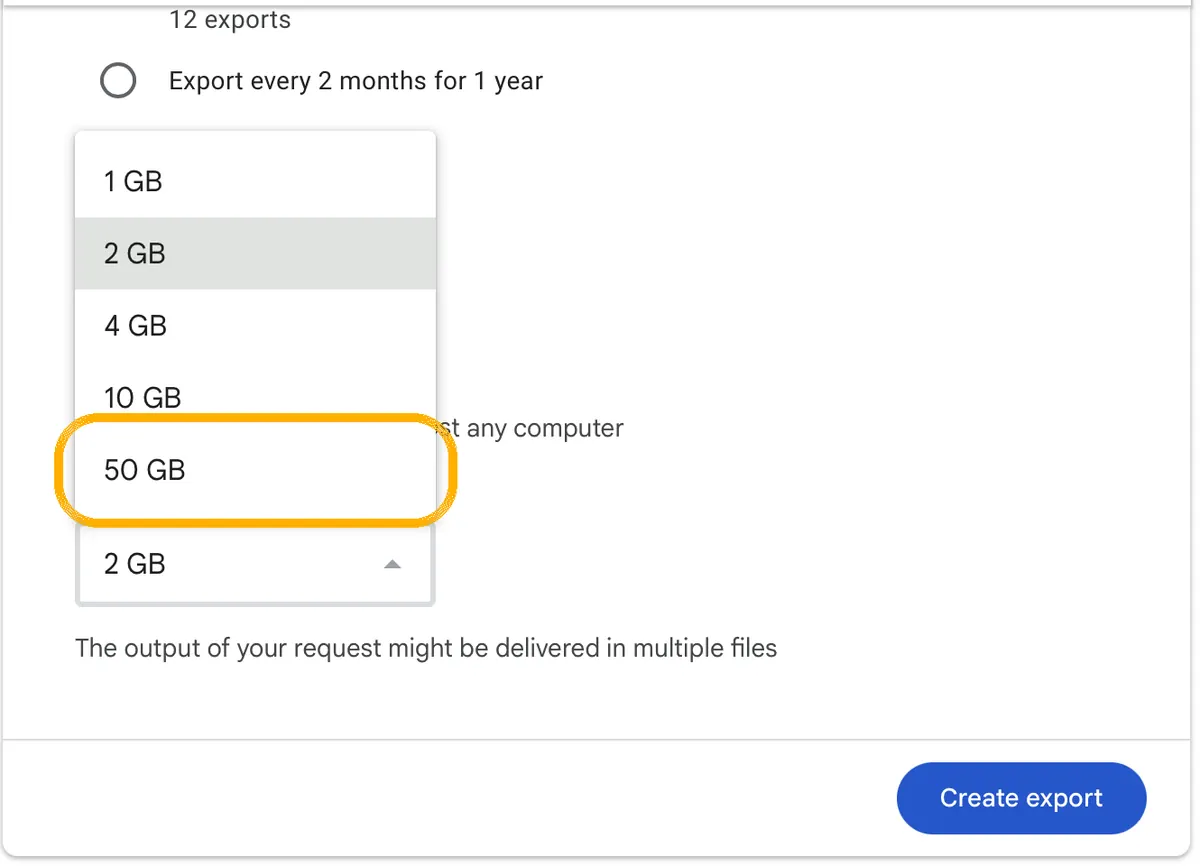
4. Choose 50 GB as the file size and click Create export. Good to know
Google Docs come as Word files and Sheets as Excel files. Check this in Takeout's Drive options before you create the export. Takeout only includes documents you own: download the ones others shared with you yourself.
- Check you have everything
Before you delete anything, open a few of your downloaded documents and spreadsheets and check they're complete.
- Move your documents to the Trash
Go to drive.google.com, select the documents and spreadsheets you've moved, right-click and choose “Move to Trash”.
Good to know
People you shared a file with can still open it until it's deleted for good.
- Empty the Trash
Click Trash on the left, then “Empty trash” › “Delete forever”. Now they're gone for good, also for the people you shared them with.
Good to know
If you don't empty it, Google deletes files in the Trash after 30 days.
Pages and Numbers are free and come with your Mac, so there's nothing to cancel. Once your documents are exported to Word and Excel, you can simply leave them.
Do I lose my documents if I remove Office?
No. Uninstalling Office only removes the apps; your documents stay on your computer. Documents you saved in OneDrive stay there too, but after cancelling you only get 5 GB free. If you use more, OneDrive becomes read-only, and after six months Microsoft may delete it. Download what you need first.
Does Google still have my documents?
Yes, until you delete them in Google Drive. Files in the Trash are deleted for good after 30 days, or straight away when you click “Empty trash”. This doesn't close your Google Account.
Will my Word and Excel files look exactly the same?
Simple ones, yes. Word and Excel macros (small built-in programs) often don't work in LibreOffice, and complex layouts, tables or charts can need some tidying up. Always check an important file before you send it.
Step 3: Messaging
The app is quick, but your family and friends have to come along. Start with one group.Keep your progress?
Just your email. No password: I send you a code.
Check your email
I sent a 6-digit code to . It works for 10 minutes. Not in your inbox? Check your spam folder.
✓ Saved
You're logged in as . Your progress is saved and you can continue on any device. Your account
I only store your email and your progress. Privacy
·
What is LibreOffice? Who's behind it, privacy and cost →
Checked against the official help pages on 4 October 2026. Sources
Sources
- LibreOffice: download
- LibreOffice: installation instructions (Mac and Windows)
- LibreOffice: system requirements
- LibreOffice help: Start Center
- LibreOffice help: Load/Save – General (default file format)
- LibreOffice help: Microsoft Office files
- Apple: choose an app to open a file on Mac
- Apple: opening apps from the internet safely
- Collabora Office in the App Store
- Proton: Google Takeout steps for Drive
- Microsoft: cancel a Microsoft 365 subscription
- Microsoft: what happens when your subscription expires
- Microsoft: uninstall Office for Mac
- Microsoft: uninstall Microsoft 365 from a PC
- Google: download a file from Google Docs
- Google: delete files in Google Drive
- University of Michigan: Takeout leaves out files owned by others
- Apple: convert Pages and Numbers files to Word and Excel
- Apple: export to Word in Pages on Mac
The installer file for apps on a Mac. Open it, then drag the app to your Applications folder.
Save a copy of your things from an app into a file, so you can keep it or open it somewhere else.
Google's own tool to download a copy of everything you have at Google, like mail, photos and files.
Storage on the internet instead of on your own device, so you can reach your files from anywhere.