How to switch from Google Photos to kDrive by Infomaniak
Where are your photos now?
Switch to kDrive by Infomaniak
Tick each step when it's done. Nothing gets deleted: everything in where your photos are now stays put until you remove it yourself.
Nothing is deleted while you move: your photos stay with where your photos are now until you remove them yourself.
Google Photos
You download your photos with , then put them in kDrive.
- Infomaniak: my kSuite
Good to know
You need a European mobile number, and you get one free account per person.
- one.google.com/storage
Good to know
Your computer also needs free space for the download: about twice the size, because you unpack it.
- takeout.google.com
What it looks like
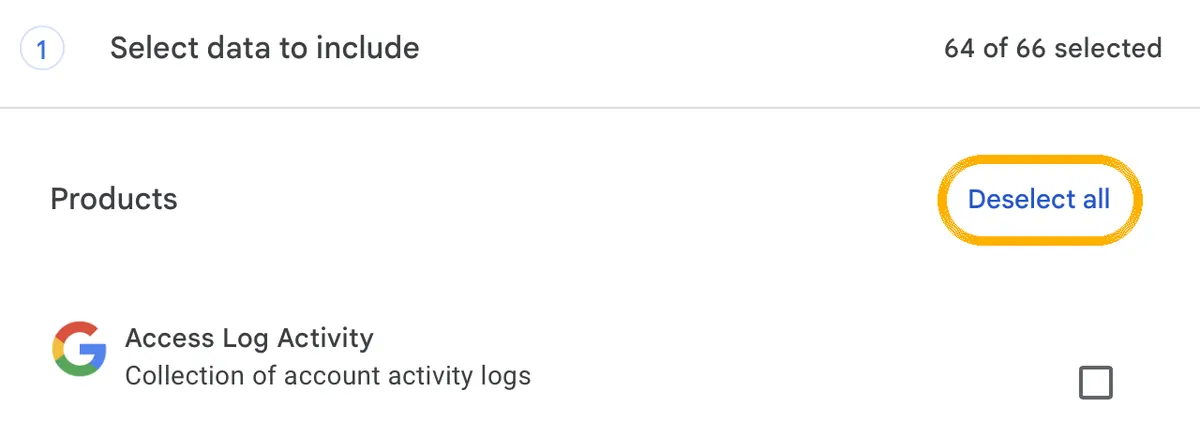
1. Click this first. Then nothing is ticked any more. 
2. Scroll to Google Photos and tick only that. 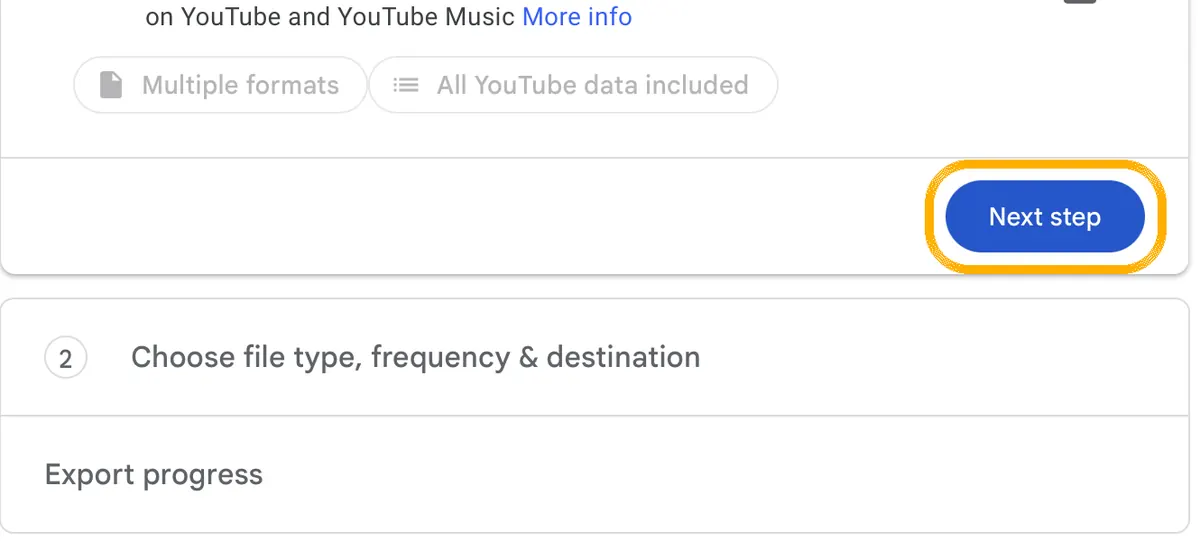
3. At the very bottom: Next step. 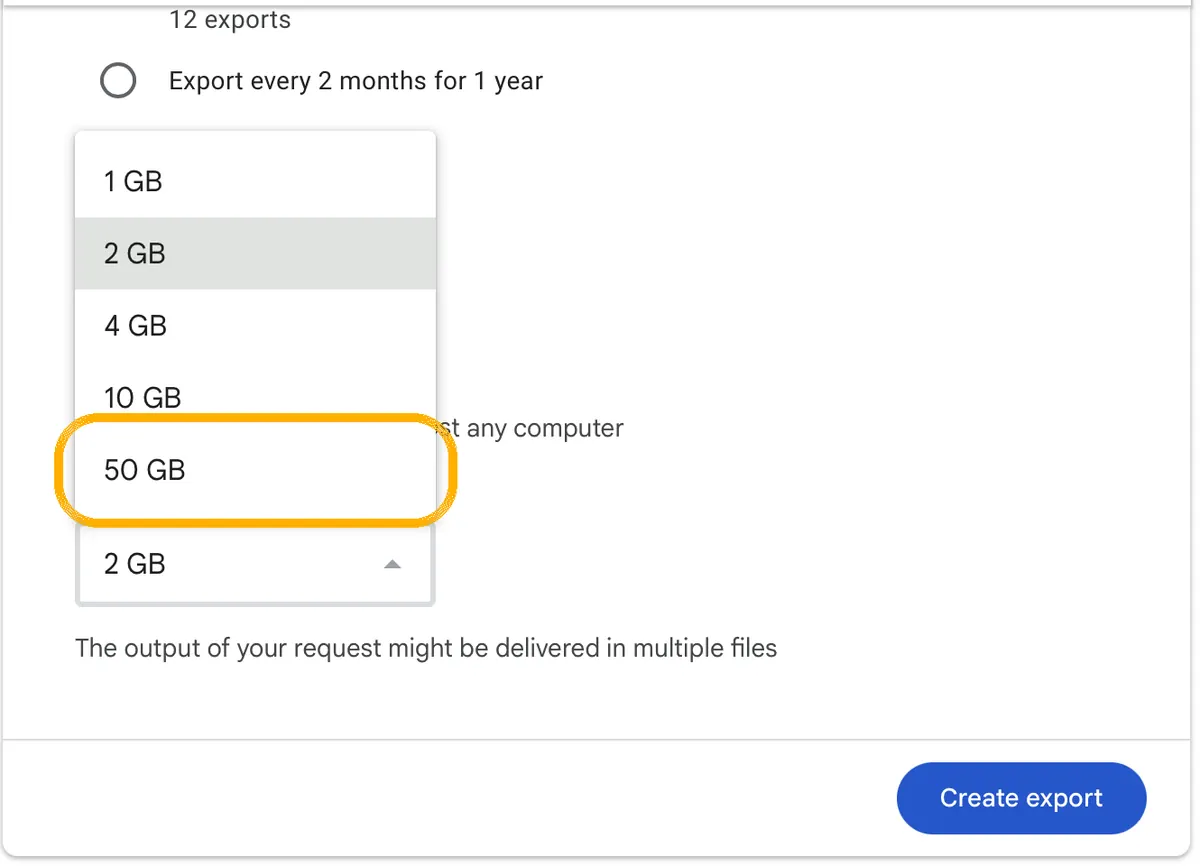
4. Choose 50 GB as the file size and click Create export. Good to know
Most people get the email the same day; with many photos it can take a few days. Good to know: photos that other people added to shared albums are not in this download. Want to keep them? Open those albums and download them yourself.
-
Good to know
The download link works for about a week, and each file can be downloaded 5 times. After that, you need to make a new export.
- ksuite.infomaniak.com/kdrive
Good to know
In your photo folders you will also see small .json files. Google keeps details like the date and albums in them. Don't delete them before the upload. Upload each unzipped folder. Large libraries take a while.
- kDrive for iPhone and Android
Good to know
Leave the line “Save” on “from now on”: your older photos are already in kDrive, so they don't end up there twice. The first backup can take a long time with many photos. Stay on Wi-Fi.
iCloud Photos
kDrive can't copy from iCloud. On iPhone, the kDrive app puts your photos in kDrive. On your computer you keep a spare copy.
- Infomaniak: my kSuite
Good to know
You need a European mobile number, and you get one free account per person.
- kDrive for iPhone and Android
Good to know
For the sharpest photos: on your iPhone, go to Settings › Apps › Photos (on the newest iOS, one screen deeper, under iPhone storage) and choose “Download and Keep Originals” before you start, if your iPhone has room. Then the full-size photos are on your phone and kDrive backs those up. With “Optimize iPhone Storage”, your phone only keeps smaller versions; kDrive doesn't say whether its app then fetches the full-size ones from iCloud. The first backup can take a long time with many photos. Stay on Wi-Fi.
- icloud.com/photos
Good to know
On a Mac: in Photos, go to Photos › Settings › iCloud and choose “Download Originals to this Mac”. When it's done, select all photos and choose File › , then the option to export the unmodified originals. Without a Mac, go to icloud.com/photos and download your photos as unmodified originals, up to 1,000 at a time. Photos in shared albums are not part of your own library: save the ones you want to keep from those albums separately. Very big library? Apple can also prepare a full copy at privacy.apple.com (“Request a copy of your data”); you then have 14 days to download it.
-
Good to know
Your iPhone asks whether to download a copy of your iCloud Photos to this iPhone. Choose to download the photos and videos, not to remove them from the iPhone: removing deletes the photos that are only stored as smaller versions on your phone. Not sure? Tap Cancel and nothing changes.
OneDrive
kDrive can copy your OneDrive for you, photos included, straight from Microsoft.
- Infomaniak: my kSuite
Good to know
You need a European mobile number, and you get one free account per person.
- ksuite.infomaniak.com/kdrive
Good to know
Don't change your OneDrive password until the copy is done.
- kDrive for iPhone and Android
Good to know
Leave the line “Save” on “from now on”: your older photos are already in kDrive, so they don't end up there twice. Weren't the photos on your phone in OneDrive? Then choose “All photos”. The first backup can take a long time with many photos. Stay on Wi-Fi.
Dropbox
kDrive can copy your Dropbox for you, photos included, straight from Dropbox.
- Infomaniak: my kSuite
Good to know
You need a European mobile number, and you get one free account per person.
- ksuite.infomaniak.com/kdrive
Good to know
Don't change your Dropbox password until the copy is done.
- kDrive for iPhone and Android
Good to know
Leave the line “Save” on “from now on”: your older photos are already in kDrive, so they don't end up there twice. Weren't the photos on your phone in Dropbox? Then choose “All photos”. The first backup can take a long time with many photos. Stay on Wi-Fi.
All done? Then tap I've switched ✓.
Rather use Proton Drive or pCloud?
Nice, that's one! Your photos are with kDrive by Infomaniak now.
Keep your old one around for a while. There's no rush to close it.
And where your photos are now? What to do with it, when you're ready
You don't have to delete anything at where your photos are now right away. Leave your photos there for a while, until you've checked that everything is in kDrive: compare the number of photos and open a few old albums. Just make sure backup is off, so new photos only go to kDrive. Paying for extra space? Once your photos have moved, a smaller plan is often enough: see below how to save money.
Deleting your photos from Google, when you're ready
- Check that everything is in your new storage
Compare the number of photos, and open a few old albums. Also keep the folders you downloaded on your computer (or an external drive) for now, as an extra copy. Deleting can't be undone after 30 days.
- Remove Google Photos from your phone
Do this first: photos you delete in Google Photos also disappear from phones where Google Photos has backup on. iPhone: touch and hold the app, then Remove App › Delete App. Android: Settings › Apps › Photos › Disable (on some phones: Turn off).
Good to know
On some Android phones, Google Photos is the only gallery app. Then keep it, with backup off.
- Delete your photos at Google
First check that backup is off in Google Photos on all your phones and tablets: otherwise the photos also disappear from those devices. Then, on a computer, go to photos.google.com. Select photos, click the trash icon and choose “Move to trash”. Then open Trash and click “Empty trash”.
Good to know
Photos in the trash are deleted for good after 30 days. Emptying the trash can't be undone.
- Pay less for Google storage, or stop
Only if you pay Google for extra storage. Gmail, Drive and Photos share that space, so check how much you still use now that your photos are out: one.google.com/storage shows it. Often a smaller plan is enough: go to google.com/settings/storage, click the price of the plan you want and click Subscribe. Is the free 15 GB enough? Then cancel: one.google.com › Settings › Cancel membership.
Good to know
A smaller plan starts at the next month of your plan. Keep some room to spare: if you use more than your plan, Gmail can't send or receive email. Paid through the App Store on iPhone? Change it there.
Deleting your photos from iCloud, when you're ready
- Check that everything is in your new storage
Compare the number of photos. Make sure your new app backs up new photos. Also keep the copy on your computer (or an external drive) for now, as an extra copy.
- Delete your photos from iCloud
On your iPhone, go to Settings › your name › iCloud › Storage › iCloud Photos and tap “Turn Off and Delete Photos”. This stops iCloud Photos on all your devices.
Good to know
Apple keeps your photos for 30 days, so you can still change your mind. Download first any photos that are only in iCloud.
- Pay less for iCloud+, or stop
Check how much iCloud space you still use now that your photos are out: on your iPhone, go to Settings › your name › iCloud and open your storage (Manage Storage). iPhone backups, Mail and Messages use iCloud too. Then tap Change Storage Plan: it shows how much you use, and you can pick a smaller plan that fits. Is the free 5 GB enough? Then go to Settings › your name › Subscriptions › iCloud+ and choose Cancel Subscription.
Settingsyour nameiCloudManage StorageChange Storage Plan
Good to know
The new plan starts when the period you paid for ends. Keep some room to spare: if you use more than your plan, iCloud stops syncing and iPhone backups stop. On a Mac: System Settings › Apple Account › iCloud › Manage Plan. With the free plan you also lose Hide My Email and Private Relay.
Deleting your photos from OneDrive, when you're ready
- Check that everything is in your new storage
Compare the number of photos. Also keep the folder you downloaded on your computer for now, as an extra copy.
- Delete your photos from OneDrive
Go to onedrive.live.com, open the folder with your phone's photos (usually Pictures › Camera Roll), select the photos and delete them. Then empty the Recycle bin.
Good to know
Leaving OneDrive altogether? The part “Files in the cloud” shows how to unlink it from your computer.
- Pay less for Microsoft 365, or stop
Only if you pay Microsoft for the storage. Check how much OneDrive space you still use now that your photos are out: onedrive.live.com shows it at the bottom left. Need only a little? Microsoft 365 Basic gives you 100 GB for €2 a month. Enough with the free 5 GB? Then cancel at account.microsoft.com/services/microsoft365.
Good to know
Microsoft 365 Basic and the free plan don't include Word and Excel on your computer. If you keep more than your plan for 6 months, Microsoft may delete your OneDrive.
Deleting your photos from Dropbox, when you're ready
- Check that everything is in your new storage
Compare the number of photos. Also keep the folder you downloaded on your computer for now, as an extra copy.
- Delete your photos from Dropbox
Go to dropbox.com, open Camera Uploads, select the photos and delete them.
Good to know
Moving your files away from Dropbox too? Then do that first, in the part “Files in the cloud”.
- Stop paying for Dropbox, if you can
Check how much Dropbox space you still use now that your photos are out. Does it fit in the free 2 GB? Then on dropbox.com, click your profile picture at the bottom left, then Manage account › Cancel plan.
Profile pictureManage accountCancel plan
Good to know
If you keep more than the free plan, Dropbox stops syncing and may delete files. Paid in the App Store or Google Play? Cancel it there.
Download your photos in the Amazon Photos app or website and upload them like the folders above. I don't have step-by-step help for Amazon Photos yet.
Is it a risk to leave my photos and files at Google or Apple?
They stay as safe as they were, but they're not private. At Apple, iCloud Photos and iCloud Drive are only if you turn on Advanced Data Protection; otherwise Apple holds the keys. Google offers with your own keys only for business accounts, so for a normal Google account, Google holds the keys.
Can I stop paying and just leave everything there?
Only if it fits in the free space: 15 GB at Google (shared with Gmail), 5 GB at Apple and Microsoft, 2 GB at Dropbox. Above that, Gmail can't send or receive email and syncing stops. Microsoft may delete your OneDrive after 6 months over the limit.
What happens if my free space runs full?
Free up space or upgrade within 30 days. Otherwise Infomaniak blocks the account, and 7 days later deletes its data for good. Keep an eye on it if you store lots of photos.
Is kDrive encrypted like Proton Drive?
Not end-to-end. Your files are stored in Infomaniak's own data centres in Switzerland and never used for advertising, but Infomaniak can technically open them, as Google can. Proton Drive can't.
Files in the cloud
Instead of Google Drive, iCloud Drive, OneDrive and other storageKeep your progress?
Just your email. No password: I send you a code.
Check your email
I sent a 6-digit code to . It works for 10 minutes. Not in your inbox? Check your spam folder.
✓ Saved
You're logged in as . Your progress is saved and you can continue on any device. Your account
I only store your email and your progress. Privacy
·
What is kDrive by Infomaniak? Who's behind it, privacy and cost →
Checked against the official help pages on 6 October 2026. Sources
Sources
- Infomaniak: my kSuite plans and prices
- Infomaniak: limits of the free my kSuite
- Infomaniak: import external data into kDrive
- Infomaniak: import Google Photos into kDrive
- Infomaniak: photo backup on iPhone
- Infomaniak: photo backup on Android
- Infomaniak: kDrive on different devices
- Infomaniak: download kDrive
- Google: download your data (Takeout)
- Google Photos: turn backup on or off
- Google Photos: delete photos (backup off first)
- Google Drive: delete files
- Google One: cancel membership
- Apple: download iCloud photos and videos
- Apple: work with files in iCloud Drive on Mac (Download Now)
- Apple: turn off Desktop & Documents Folders
- Metadata Fixer: what Google Takeout leaves out (shared albums)
- Apple: copy the information you store in iCloud
- Apple: request a copy of your data
- Apple: turn off iCloud Photos
- Apple: delete files on iCloud.com
- Apple: downgrade or cancel iCloud+
- Google One: change or cancel storage plans
- Microsoft 365: compare plans (Basic)
- Apple: iCloud data security overview
- Google Workspace: about client-side encryption
- Microsoft: download files from OneDrive
- Microsoft: OneDrive camera upload on iOS
- Microsoft: OneDrive camera backup on Android (Camera Roll folder)
- Dropbox: camera uploads go to the Camera Uploads folder
- Microsoft: OneDrive folder backup
- Microsoft: turn off or unlink OneDrive
- Microsoft: cancel Microsoft 365
- Dropbox: download files and folders
- Dropbox: camera uploads
- Dropbox: cancel a subscription
- Proton Drive iOS and Android source code: photo backup skips duplicates (same name and content)
- kDrive iOS source code: photo backup choices (new only, all, from date)
Google's own tool to download a copy of everything you have at Google, like mail, photos and files.
Save a copy of your things from an app into a file, so you can keep it or open it somewhere else.
Copy your things, like bookmarks or mail, from the old app into the new one. The originals stay where they are.
An extra copy of your data, so you don't lose it if something goes wrong.
Storage on the internet instead of on your own device, so you can reach your files from anywhere.
Scrambled on your own device, so only you (and the people you send it to) can read it. Not even the company can.
Scrambled so that only someone with the right key or password can read it.